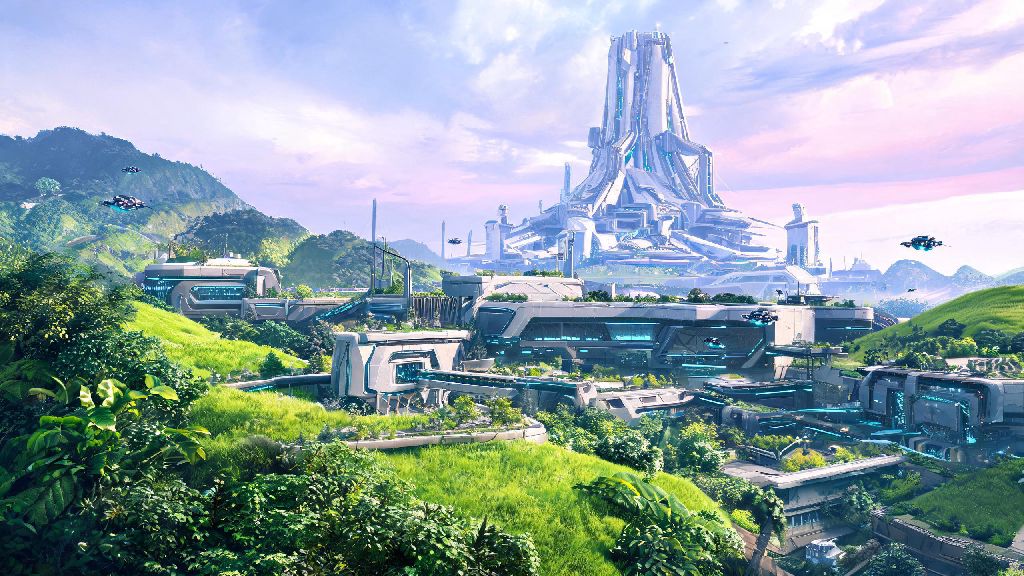
If you’ve been hyped for the upcoming Arknights Endfield open-world RPG since its first trailer dropped, you’ve probably thought about adding a bit of that game’s sleek, sci-fi fantasy aesthetic to your daily devices. Arknights Endfield wallpapers are the easiest, most affordable way to show off your love for the franchise, whether you’re customizing your phone home screen, desktop, or gaming console dashboard. But if you’ve ever searched for these wallpapers before, you know how hard it can be to find high-res options that don’t look stretched, blurry, or full of random watermarks. This guide breaks down everything you need to know to find, pick, and customize the perfect wallpaper for any device.
Types of Arknights Endfield Wallpapers Worth Downloading
Not all wallpapers are created equal, and knowing the difference between available options will save you a lot of time scrolling through low-quality results. The two main categories you’ll find are official and fan-made, each with their own pros and cons depending on what you’re looking for. Official wallpapers are released directly by Hypergryph, the game’s developer, so they’re always high resolution and free to use for personal purposes. You’ll usually find these posted alongside new trailer drops, character reveals, or game announcement events, and they often feature untouched promotional art of characters and in-game locations.
Fan-made wallpapers are created by the massive, talented Arknights community, and they often feature more creative, unique designs you won’t find anywhere else. These can range from minimalist logo designs to dynamic action shots of your favorite characters, or even crossover art that blends Endfield’s aesthetic with the original Arknights universe. Official wallpapers are always the safest bet if you want zero risk of pixelation or copyright issues for personal use. If you opt for fan-made art, you’ll get access to way more variety, but you have to be mindful of usage rules set by the original creator.
Right now, the most popular Arknights Endfield wallpaper themes people are searching for include:
I’ve fallen for way too many low-res fake wallpapers in the past, so I’ve learned to check file size before I hit download – anything under 500KB is almost always compressed and will look blurry on modern screens. Always check the artist’s usage rules before reposting fan-made wallpapers to social media, even if you’re not making money off the post. Most creators are fine with personal use, but many ask for credit when their work is shared publicly.
How to Choose the Right Resolution for Your Device
Even the most beautiful Arknights Endfield wallpapers will look terrible if you pick the wrong resolution for your screen. The key rule here is to always download a wallpaper that is equal to or larger than your device’s native resolution, never smaller. When you use a smaller image and stretch it to fit your screen, you’ll notice fuzzy edges, pixelated details, and distorted colors that ruin the whole look.
For desktops and laptops, the most common resolutions are 1920x1080 (Full HD), 2560x1440 (QHD), and 3840x2160 (4K). If you’re downloading Arknights Endfield wallpapers for a 4K monitor, always prioritize files that are 3840x2160 or larger to get the crispest possible look. For phones, resolutions vary more widely depending on your model, but most modern flagship phones use 1080x2340 or 1440x3200 resolutions. If you switch between multiple devices regularly, look for wallpapers with a centered focal point, so you can crop the same image for both your phone and desktop without cutting out important details like character faces or key landscape features.
If you can only find a lower resolution version of a wallpaper you love, avoid stretching it to fit your screen – add a matching color border instead to preserve image quality. Most built-in phone and desktop photo editors let you add borders in 10 seconds or less, and this trick will make even slightly too-small wallpapers look intentional instead of messy. If you use a smart watch that supports custom wallpapers, you can crop a close-up of your favorite character’s face from a larger high-res wallpaper for a fun, subtle look.
Easy Customization Tips to Make Your Wallpaper Stand Out
You don’t need advanced photo editing skills to make your Arknights Endfield wallpapers feel more personal and functional for your setup. Small, quick tweaks can make a huge difference in how the wallpaper looks alongside your app icons, widgets, and overall device theme. For example, if you have a lot of app icons on your home screen, adding a subtle blur to the background of the wallpaper will make the icons easier to read without hiding the art underneath. Most free photo editing apps let you adjust blur strength in a few taps, so you can find the perfect balance between visibility and aesthetic.
If you use dark mode on all your devices, adding a low-opacity dark overlay to your wallpaper will help it blend better with your UI instead of clashing with dark menus and text. You can even add small custom text like your favorite character’s quote to Arknights Endfield wallpapers if you want an extra personal touch, as long as you don’t cover up the main art. Adding a 10-15% opacity dark overlay is the easiest way to make text and app icons pop on busy, detailed wallpapers. This trick also reduces eye strain if you use your phone or computer late at night, since it cuts down on harsh bright spots from the art.
For gaming PC setups, you can match the main color of your wallpaper to your RGB lighting scheme for a super cohesive vibe. If your wallpaper features lots of warm orange and yellow tones from Endfield’s desert regions, set your keyboard and case RGB to warm oranges to tie the whole look together. Avoid wallpapers with busy patterns in the bottom third of your phone screen, as that's where most of your frequently used app icons sit. Opt for designs with more empty space in that area, or adjust the crop to move busy sections to the top of the screen where they won’t cover icons.
Common Mistakes to Avoid When Using Game Wallpapers
After years of customizing every device I own with game wallpapers, I’ve picked up on a few common mistakes that ruin the experience for a lot of people. The first and most important one is downloading wallpapers from untrusted, random sites that force you to click through dozens of pop-ups to access the file. Many of these sites host low-quality compressed files, and some even attach malware to downloads that can harm your device. Stick to official game social media accounts, reputable art platforms, or verified fan community groups to download your files to stay safe.
Another common mistake is using copyrighted wallpapers for commercial purposes, even if you think they look cool. That means you can’t print Arknights Endfield wallpapers on t-shirts, mugs, or other merch to sell, even if it’s fan-made art. Most creators allow personal use, but commercial use almost always requires explicit permission from both the artist and the game’s developer. Even if you’re not selling anything, you should never claim fan-made art as your own when sharing it online.
Don’t forget to adjust your device’s wallpaper settings after you set your new image, either. For example, iPhones turn on parallax effect by default, which shifts the wallpaper slightly when you move your phone, and this can cut off edges of the art you wanted to show off. Turn off the effect or use the “perspective zoom” toggle to make sure your wallpaper stays exactly how you cropped it. Never download wallpaper files from sites that force you to click through multiple pop-ups or install extra software to access the file. If a site seems sketchy, it’s not worth risking your device security for a wallpaper.
At the end of the day, arknights endfield wallpapers are a fun, low-effort way to show your excitement for the game while making your devices feel more personal. You don’t have to be a design expert to find or make a great one – just follow the tips we covered to pick the right resolution, avoid common pitfalls, and customize it to fit your setup. If you find a wallpaper you love, don’t forget to share it with other fans in community groups, as long as you credit the original creator. As more official art and fan creations drop as we get closer to the game’s launch, you’ll have even more amazing options to choose from.